浏览器的加载原理 & Eventloop

[musings]
又开始打地基,把一些基础的底层原理都过一遍,写博客的原因也是因为想通过费曼学习法来加深印象,免得学了又忘,忘了又学

浏览器引擎
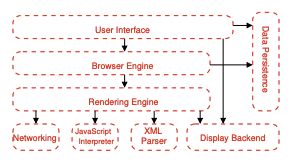

引用来自https://grosskurth.ca/papers/browser-refarch.pdf

渲染过程分为: 网络 , js解析 , UI渲染

UI渲染又包括, html解析,css解析
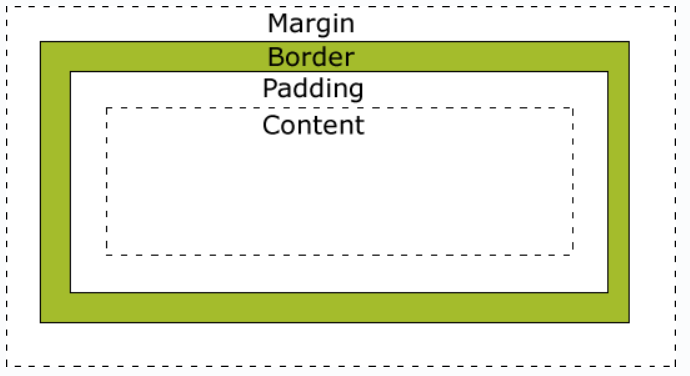
这里就贴一下盒子模型的图片
EventLoop

浏览器中的进程与线程
浏览器进程
网络进程
渲染进程

我们主要看渲染进程包含: HTML 解析,css解析,计算样式,处理图层,执行全局js代码,执行事件处理函数,计时器callback 等等

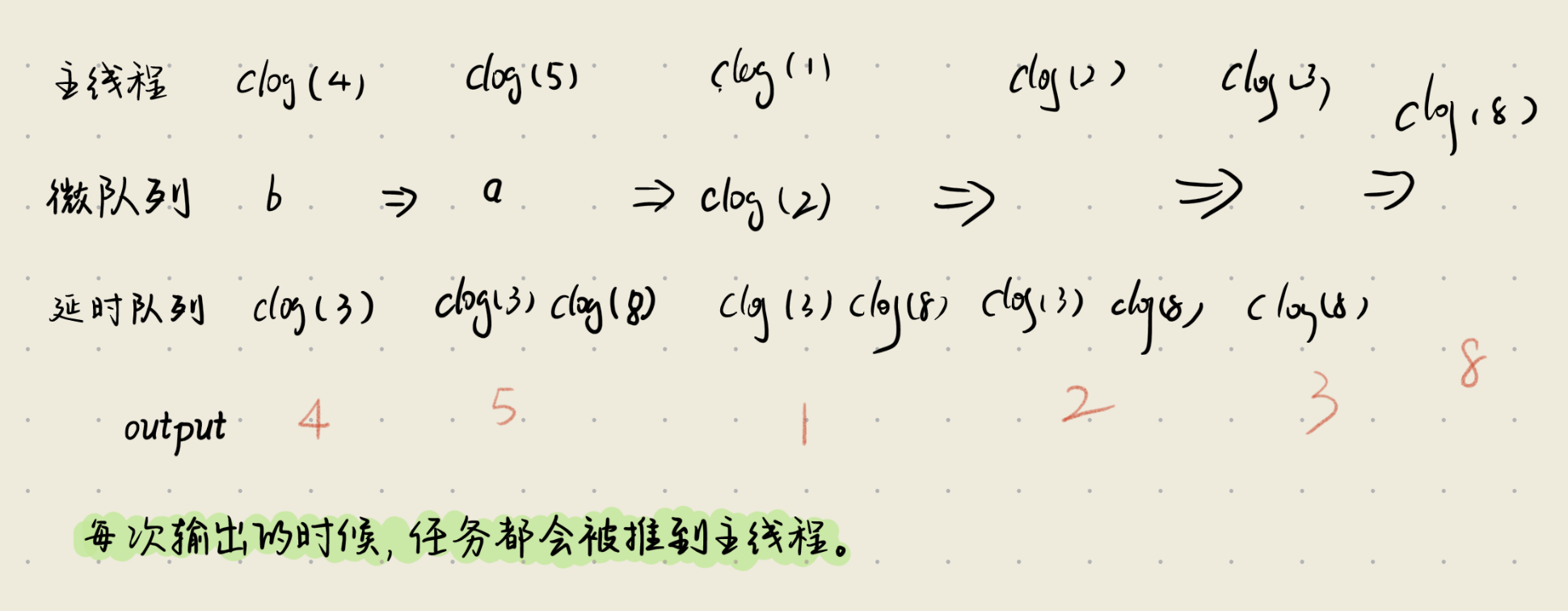
我们主要来看下EventLoop的过程,总共有三类任务,也就有三个队列
微队列:优先级最高,e.g Promise
交互队列: 优先级高,存放用户交互以后的任务
延迟队列: 优先级中,计时器到达后执行的任务

case 1:

1
2
3
4
5
6
7
8
9
10
11
12
13
14
15
16
17
18
19
20
21
function a() {
console.log(1);
Promise.resolve().then(
() => {
console.log(2);
}
)
}
setTimeout(() => {
console.log(3)
}, 0);
function b() {
console.log(5);
setTimeout(() => {
console.log(8)
}, 0);
}
Promise.resolve().then(b);
console.log(4);
Promise.resolve().then(a);

详解:

Case 2

1
2
3
4
5
6
7
8
9
10
11
12
13
14
15
16
17
18
19
20
21
22
23
24
console.log(1)
setTimeout(function () {
console.log(2)
new Promise(function (resolve) {
console.log(3)
resolve(4)
}).then(function (num) {
console.log(num)
})
}, 300)


new Promise(function (resolve) {
console.log(5)
resolve(6)
}).then(function (num) {
console.log(num)
})

setTimeout(function () {
console.log(7)
}, 400)

// 1 5 6 2 3 4 7

引入新case:

1
2
3
4
5
6
7
8
9
10
11
12
13
14
15
16
17
18
19
20
21
22
23
function a() {
console.log(1);
process.nextTick(()=>console.log(20));
Promise.resolve().then(
() => {
console.log(2);
}
);
}
Promise.resolve().then(a);
//1 2 20
//区分这两个case的区别
function a() {
console.log(1);
process.nextTick(()=>console.log(20));
Promise.resolve().then(
() => {
console.log(2);
}
);
}
a()
//1 20 2

为什么?
因为第一个case里本身的整个a()都是在微任务队列中,所以即使tick的任务优先级更高,但是现在在微任务队列里,会先执行微任务队列,直至清空

1
2
3
4
5
6
7
8
9
10
11
12
13
14
function a() {
console.log(1);
process.nextTick(()=>console.log(20));
Promise.resolve().then(
() => {
console.log(2);
}
);
}
Promise.resolve().then(()=>a());
a();

//1 20 1 2 2 20

这个case需要注意的是整个a方法被丢入到微任务队列,但是整个第二个a方法先执行,且当第二个a方法主栈任务执行完毕以后,会走tick队列,然后走微任务队列,此时的微任务队列里有a方法本身

具体步骤:
🧠 执行流程详解(按时间线)
第一步:执行所有同步代码
遇到 Promise.resolve().then(() => a()) → 把回调加入 微任务队列
执行 a()(同步调用):
console.log(1) → 输出 1
process.nextTick(() => console.log(20)) → 加入 nextTick 队列
Promise.resolve().then(() => console.log(2)) → 加入 微任务队列
✅ 当前状态:

输出:1
nextTick 队列:[ () => log(20) ]
微任务队列:[ () => a(), () => log(2) ]
⚠️ 注意:同步代码还没结束!a() 是同步调用的,所以它完全执行完才算同步结束。

第二步:同步代码结束 → 开始清空 nextTick 队列
执行 () => console.log(20) → 输出 20
✅ 输出现在是:1, 20

✅ 这就是同步调用的 a() 中的 nextTick 立刻生效!

第三步:清空 微任务队列
微任务队列当前是:[ () => a(), () => log(2) ]

按顺序执行:

执行 () => a()(这是你在 Promise.then 里注册的)
console.log(1) → 输出 1
process.nextTick(() => console.log(20)) → 加入 nextTick 队列
Promise.resolve().then(() => console.log(2)) → 加入微任务队列
✅ 输出追加:1

✅ 现在:
nextTick 队列:[ () => log(20) ](来自这次 a())
微任务队列:[ () => log(2)(来自第一次 a), () => log(2)(来自第二次 a)]
继续清空微任务队列(因为还没空!)
执行第一个 () => console.log(2) → 输出 2
执行第二个 () => console.log(2) → 输出 2
✅ 输出现在是:1, 20, 1, 2, 2

第四步:微任务队列终于空了 → 清空 nextTick 队列
执行 () => console.log(20)(来自微任务中调用的 a())→ 输出 20
✅ 最终输出:
1 ← 同步 a()
20 ← 同步 a() 的 nextTick
1 ← 微任务中的 a()
2 ← 第一个 Promise.then(来自同步 a)
2 ← 第二个 Promise.then(来自微任务 a)
20 ← 微任务 a() 的 nextTick
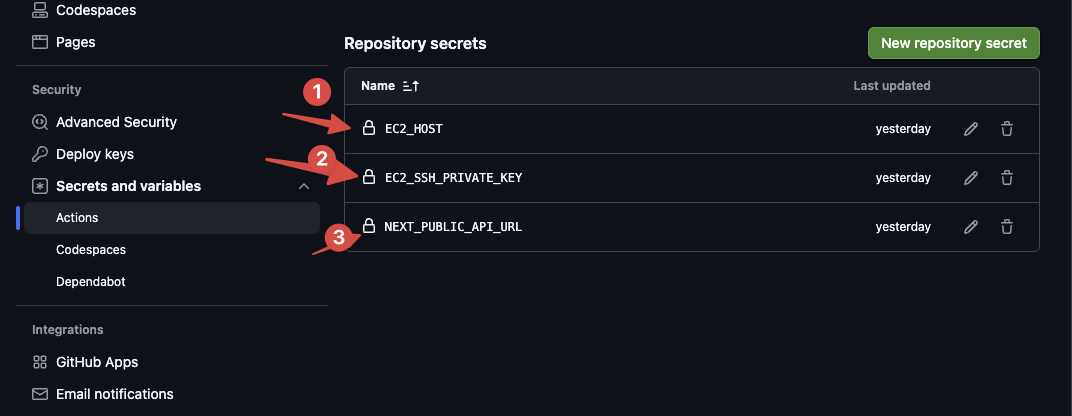

Git Action 极速搭建

  1. 生成对应的密钥
    ssh-keygen -t rsa -b 4096 -f ~/.ssh/your_custom_filename
    私钥放到EC2_SSH_PRIVATE_KEY

  2. 项目中生成对应的.github/workflows/deploy.yml

1
2
3
4
5
6
7
8
9
10
11
12
13
14
15
16
17
18
19
20
21
22
23
24
25
26
27
28
29
30
31
32
33
34
35
36
37
38
39
40
41
42
43
44
45
46
47
48
49
50
51
52
53
54
55
56
57
58
59
60
61
62
63
64
65
66
67
68
69
70
71
72
73
74
75
76
77
78
name: Deploy to EC2

on:
push:
branches: [ main ]

jobs:
deploy:
runs-on: ubuntu-latest

steps:
- name: 📥 Checkout code
uses: actions/checkout@v4

- name: 🟢 Setup Node.js
uses: actions/setup-node@v4
with:
node-version: '18'
cache: 'npm'

- name: 📦 Install dependencies
run: npm ci

- name: ⚙️ Build app
run: npm run build

- name: 📦 Prepare deployment package
run: |
mkdir -p deploy-package
cp -r .next public next.config.js package.json package-lock.json deploy-package/
# 如果有 .env 文件也复制(确保它在 Git 中)
if [ -f .env ]; then
cp .env deploy-package/
echo "✅ .env included in deployment"
else
echo "⚠️ No .env file found (make sure it's committed or handled separately)"
fi
# 调试:显示部署包内容
echo "=== Deployment package contents ==="
ls -la deploy-package/

- name: 🔑 Setup SSH key
run: |
mkdir -p ~/.ssh
echo "$EC2_SSH_PRIVATE_KEY" > ~/.ssh/id_rsa
chmod 600 ~/.ssh/id_rsa
ssh-keyscan "$EC2_HOST" >> ~/.ssh/known_hosts
env:
EC2_SSH_PRIVATE_KEY: ${{ secrets.EC2_SSH_PRIVATE_KEY }}
EC2_HOST: ${{ secrets.EC2_HOST }}

- name: 📁 Create app directory on EC2
run: ssh deployer@${{ secrets.EC2_HOST }} "mkdir -p /home/deployer/app/ArtChais-Web"

- name: 🚀 Sync files to EC2
run: |
rsync -avz --delete \
deploy-package/ \
deployer@${{ secrets.EC2_HOST }}:/home/deployer/app/ArtChais-Web/
env:
EC2_HOST: ${{ secrets.EC2_HOST }}

- name: 🔄 Restart app on EC2
run: |
ssh deployer@${{ secrets.EC2_HOST }} << 'EOF'
export PATH="$HOME/.npm-global/bin:$PATH"
cd /home/deployer/app/ArtChais-Web
npm ci --omit=dev
pm2 delete artchais-web 2>/dev/null || true
pm2 start "npm start" \
--name "artchais-web" \
--output "/home/deployer/app/ArtChais-Web/out.log" \
--error "/home/deployer/app/ArtChais-Web/error.log" \
--log-date-format "YYYY-MM-DD HH:mm:ss"

pm2 save
EOF

  1. ec2公钥配置

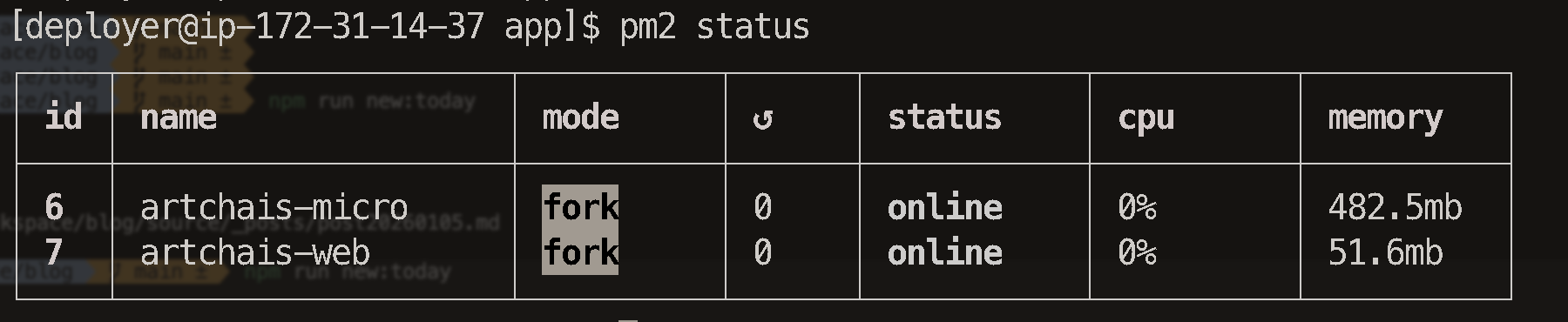
  2. PM2管理 进程

设计模式总结

[Musings]
创建型:

  • 单例模式Singleton
    单例模式分为Eager Initialization/ Lazy Initialization, eager就是在创建实例本身就已经初始化了实例,资源可能浪费,但是线程安全,Hungry则是每次调用的时候才会创建,线程不安全
  • 工厂模式Factory Method
    某一类产品一起写,说白了就是买手机,买华为/苹果/小米,一开始是自己去决定的,就得写个if else或着switch,现在直接由工厂根据入参决定,只需调用工厂的getInstance之类的方法,所有本身自己手写的逻辑就委托给工厂就行,主打的就是一类产品
  • 抽象工厂模式 Abstract Factory
    抽象工厂其实就是,一个家族的产品聚合,比如统一都是华为生态的产品,就用抽象工厂实现
  • 建造者模式 Builder
    对于超多的参数来调用构造函数的,可以规避掉超大的构造函数,且对于一些比较灵活的字段属性,可以慢慢构建,使用链式调用返回this指针,可以便于书写
  • 原型模式 Prototype
    方便对象的复制,实现cloneable接口或者手动实现拷贝构造函数

结构型:

  • 适配器模式 Adapter
    插头例子,多封装一层,适配公共的方法
  • 桥接模式 Bridge
    ali/weixin/刷卡多种支付方式,适配线上/线下多种支付场景
  • 组合模式 Composite
    文件/文件夹继承自文件系统抽象方法,可以是先多层嵌套
  • 装饰器模式 Decorator
    附魔enchantment,不同的武器,不同的附魔效果
  • 外观模式 Facade
    家庭影院,多增加一层,来份封装方法,一对多
  • 享元模式 Flyweight
    游戏中渲染树木,提取公共元素,利用缓存,提升性能
  • 代理模式 Proxy
    门禁卡例子,多封装一层,多对多

行为型:

  • 观察者模式 Observer
    observer和publisher,publisher里维护订阅者数组,推送消息
  • 中介者模式 Mediator
    多了个中间人,所有的消息中转都经过Mediator
  • 策略模式 Strategy
    把switch语句里的逻辑都打包放进了策略里,mediator通过策略来执行通知逻辑
  • 状态模式 State
    通过状态来控制publisher的推送逻辑
  • 责任链模式 Chain of Responsibility
    checker案例,每个cheker在发现无法处理问题,就会提交给下一个checker,可以外部手动setNextChecker
  • 命令模式 Command
    智能家居案例,通过实现command接口来实现不同的command,然后交由控制器来实现excute和undo以及一系列操作
  • 解释器模式 Interpreter
    sql语法解析案例,定义expression接口,通过语句的识别来定义不同类型的表达式,一类是简单的字符串比较,一类是表达式比较
  • 迭代器模式 Iterator
    迭代器申明hasNext和next方法,可以利用泛型
  • 备忘录模式 Memento
    备忘录案例,实现撤销,恢复等功能,使用history类来包含list实现回撤等功能
  • 模版方法模式 Template Method
    做饮料案例,抽象类写默认实现,同时引入protected钩子方法,来允许子类修改模版行为
  • 访问者模式 Visitor
    Element和Visitor案例,Element接口实现visit方法,所有concrete element类都把this传给visitor
    Visitor接口通过重载实现不同的visit方式

稍微总结下,找个时间再从头到位写一遍,看看新的感悟

设计模式的个人感悟总结

[Musings]
花了差不多断断续续一周的时间(10 天其实是,但是中间断了几天,干别的事去了哈哈哈),把所有的设计模式全部过了一遍
其实说白了设计模式在干嘛,就是在把屎山代码里写的很多 if else 来优化,以往可能觉得,用个 switch 来替换 if else 就行了,其实远远不够
设计模式说白了就是站在设计的角度来考虑,更多的去利用 java 的语法特性,抽象类,接口,多态,来使得代码的结构更清晰,减少超级类,超多 if else 的逻辑

// 从前有个”万能上帝类” ❌
public class GodClass {
public void doEverything(String type) {
if (type.equals(“A”)) { /_ 100 行代码 / }
else if (type.equals(“B”)) { /
200 行代码 / }
else if (type.equals(“C”)) { /
150 行代码 _/ }
// … 越来越多的 if-else
}
}

// 经过设计模式改造后 ✅
class AHandler { public void handle() { /_ 专注 A 的事 / } }
class BHandler { public void handle() { /
专注 B 的事 / } }
class CHandler { public void handle() { /
专注 C 的事 _/ } }

所谓的五大原则 SOLID 的大白话版本就是

原则 我的理解 通俗比喻
单一职责 S 把超级类打散 一个厨师不要又切菜又炒菜又洗碗
开闭原则 O 打散后的自然结果 加新菜不用重装修厨房
里氏替换 L 保证运行时正确性 儿子要像爹,不能乱改家规
接口隔离 I 不要定义超大接口 别造瑞士军刀,用专门的工具
依赖倒置 D 面向接口编程 订餐看菜单,不用管厨师是谁

等掌握了设计模式之后,还要记住一个原则: 不要过度设计,不要炫技!
KISS原则就出来了,keep it simple, stupid!

之前 Tony 老板问过我一个问题我记得很清楚,他说:“你觉得什么样的代码是好代码,更好的算法,更优雅的写法,还是更少的 bug“
我想了想,说”不确定,我觉得是代码的可读性吧,毕竟后续还有其他人要维护“
他说:”没错,如果我们写的代码连自己三个月后都看不懂,那凭什么要求别人能维护?“
物是人非了,都在匆匆忙忙中被记忆斑驳了,想起那些老板,忍不住有些泪目. Digital team真的让人很难不爱,只不过失去了,才显得珍贵吧.
欲买桂花同载酒,终不似,少年游。

迭代器模式

[Musihngs]
GoGoGo

1
2
3
4
5
6
7
8
9
10
11
12
13
14
15
16
17
18
19
20
21
22
23
24
25
26
27
28
29
30
31
32
33
34
35
36
37
38
39
40
41
42
43
44
45
46
47
48
49
50
51
52
53
@Data
@AllArgsConstructor
public class Book {
private String bookName;
private String author;
}

public interface Iterator<T> {
boolean hasNext();
T next();
}

public class BookIterator implements Iterator<Book> {
private List<Book> store;

public BookIterator(List store) {
this.store = store;
}

@Override
public boolean hasNext() {
return store.size() != 0;
}

@Override
public Book next() {
Book o = store.get(0);
store.remove(0);
return o;
}
}

public interface Shelf {
void addBook(Book book);
}

public class BookShelf implements Shelf {
private List<Book> store;

public BookShelf() {
store = new ArrayList<Book>();
}

@Override
public void addBook(Book book) {
this.store.add(book);
}

public Iterator createIterator() {
return new BookIterator(store);
}
}

✅ 核心方法:hasNext() + next() 是迭代器的标准接口
✅ 泛型通用:通过泛型实现类型安全的通用迭代器
✅ 职责分离:集合管存储,迭代器管遍历,各司其职
✅ 数据传递:只需传递内部数组,不暴露其他细节

备忘录模式

题目:文本编辑器撤销功能

请使用备忘录模式实现一个文本编辑器的撤销功能。

需求描述:

文本编辑器可以输入内容
文本编辑器可以保存当前状态(创建备忘录)
文本编辑器可以从备忘录恢复之前的状态
支持多次撤销操作
1
2
3
4
5
6
7
8
9
10
11
12
13
14
15
16
17
18
19
20
21
22
23
24
25
26
27
28
29
30
31
32
33
34
35
36
37
38
39
40
41
42
43
44
45
46
47
48
49
50
51
52
53
54
55
56
57
58
59
60
61
62
@Data
public class Memo {
private String curentData;

public Memo() {
}

public Memo(Memo memo) {
this.curentData = memo.getCurentData();
}

public void input(String data) {
System.out.println("Data input is: " + data);
curentData = data;
}
}

public class History {
List<Memo> list;
int index;

public History() {
this.index = -1;
this.list = new ArrayList<>();
}

public void save(Memo memo) {
if (index < list.size() - 1) {
list.subList(index + 1, list.size()).clear();
}
list.add(memo);
index = list.size() - 1;
}

public Memo revert() {
if (index <= 0) {
System.out.println("已经是最旧版!无法撤销!");
return list.get(0);
}
index--;
return list.get(index);
}

public Memo redo() {
if (index >= list.size() - 1) {
System.out.println("已经是最新版!无法重做!");
return list.get(list.size() - 1);
}
index++;
return list.get(index);
}
}

public class Main {
public static void main(String[] args) {
Memo memo = new Memo();
memo.input("hi, this is memo!");
History history = new History();
history.save(new Memo(memo));
memo = history.revert();
}
}

模版方法模式

题目:饮料制作系统

请使用模板方法模式实现一个饮料制作系统。

需求描述:
不同的饮料(咖啡、茶)有相似的制作步骤,但某些步骤的具体实现不同。

饮料制作通用步骤:

烧水
冲泡
倒入杯子
添加调料
具体要求:

咖啡:烧水 → 冲泡咖啡粉 → 倒入杯子 → 加糖和牛奶
茶:烧水 → 冲泡茶叶 → 倒入杯子 → 加柠檬
1
2
3
4
5
6
7
8
9
10
11
12
13
14
15
16
17
18
19
20
21
22
23
24
25
26
27
28
29
30
31
32
33
34
35
36
37
38
39
40
41
42
43
44
45
46
47
48
49
50
51
52
53
54
55
56
57
58
59
60
61
62
63
64
@Data
public abstract class Baverage {
private String source;
private String extra;

public void boilWater() {
System.out.println("烧水");
}

abstract void pourSource();

void pourIntoCup() {
System.out.println("倒入杯子");
}

abstract void addExtra();

//实现钩子来控制抽象类的行为,用protected只暴露给子类可以修改该行为
//钩子方法 - 子类可通过重写此方法控制是否添加调料
protected boolean needExtra() {
return true;
}

//模版方法的核心
public void template() {
boilWater();
pourSource();
pourIntoCup();
if (needExtra()) {
addExtra();

}
}
}

public class BlackCoffee extends Baverage {
public BlackCoffee() {
this.setSource("咖啡粉");
}

@Override
void pourSource() {
System.out.println(this.getSource());
}

@Override
void addExtra() {
System.out.println(this.getExtra());
}

//重写钩子方法,来控制父类的行为
@Override
protected boolean needExtra() {
return false;
}
}

public class Main {
public static void main(String[] args) {
Baverage coffee = new BlackCoffee();
coffee.template();
}
}

模版类的核心就是抽象类+模版方法,这里稍微加了个钩子个概念,就是父类通过申明protected方法来让子类控制父类的行为
protected修饰的方法,子类和子子孙孙类都能重写

修饰符 当前类 同包 子类 孙子类 其他包
private
protected
public

参观者模式:

题目:文档导出系统

请使用访问者模式实现一个文档导出系统。

需求描述:
你有一个文档结构,包含不同类型的元素(文本、图片、表格),需要支持多种导出格式(HTML、PDF、Markdown)。

文档元素:

TextElement - 文本元素(包含文字内容)
ImageElement - 图片元素(包含图片路径和标题)
TableElement - 表格元素(包含行列数据)
导出格式:

HTML导出:<p>文本内容</p>、<img src="路径" alt="标题">、<table>...</table>
PDF导出:模拟PDF格式输出(简单文本表示)
Markdown导出:普通文本、![标题](路径)、Markdown表格
1
2
3
4
5
6
7
8
9
10
11
12
13
14
15
16
17
18
19
20
21
22
23
24
25
26
27
28
29
30
31
32
33
34
35
36
37
38
39
40
41
42
43
44
45
46
47
48
49
50
51
52
53
54
55
56
57
58
59
60
61
62
63
64
65
66
67
68
69
70
71
72
73
74
75
76
77
78
79
80
81
82
83
84
85
86
87
88
89
90
91
92
93
94
95
96
97
98
99
public interface DocumentElement {
public void accept(Visitor visitor);
}

@Data
@AllArgsConstructor
public class ImageElement implements DocumentElement {
private String imgUrl;
private String imgSize;

@Override
public void accept(Visitor visitor) {
//核心在这里,把业务逻辑丢给visitor处理
//而不是这里通过instance的类型判断visitor,然后给不同的输出,这样会很烦
//直接把this传给visitor,让visitor用重载是代替这里的if else,然后利用重载来实现不同类型的元素的输出
visitor.visit(this);
}
}

@AllArgsConstructor
@Data
public class TableElement implements DocumentElement {
private int lineNumber;

@Override
public void accept(Visitor visitor) {
visitor.visit(this);
}
}

@Data
@AllArgsConstructor
public class TextElement implements DocumentElement {
private String text;

@Override
public void accept(Visitor visitor) {
visitor.visit(this);
}
}

public interface Visitor {
//核心在这里,重载不同类型的element的visit方式
void visit(TextElement textElement);/* 所有HTML文本逻辑 */
void visit(ImageElement imageElement);/* 所有HTML图片逻辑 */
void visit(TableElement tableElement);/* 所有HTML表格逻辑 */
}

public class HTMLVisitor implements Visitor{
@Override
public void visit(TextElement textElement) {
System.out.println("<p>" + textElement.getText() + "</p>");
}

@Override
public void visit(ImageElement imageElement) {
System.out.println("<img>" + imageElement.getImgSize() + "</img>");
}

@Override
public void visit(TableElement tableElement) {
System.out.println("<tb>" + tableElement.getLineNumber() + "</tb>");
}
}

public class PDFVisitor implements Visitor{
@Override
public void visit(ImageElement imageElement) {
}

@Override
public void visit(TableElement tableElement) {
}

@Override
public void visit(TextElement textElement) {
}
}

// 假设不用visitor模式,那么就得在documentElement的accept里去通过类型判断是什么visitor,然后在每个element对象的accept方法里,写很多的if else逻辑,这样代码的维护就会很麻烦,所以通过合理的使用重载,来代替ifelse逻辑,然后通过每个visitor的内部visit方法去把本身集成在accept里的方法都打散到各自的逻辑里

❌ 不用访问者模式(if-else地狱)
public class TextElement implements DocumentElement {
@Override
public void accept(Visitor visitor) {
// 需要判断visitor类型,每加一个新visitor就要修改这里!
if (visitor instanceof HTMLVisitor) {
System.out.println("<p>" + this.text + "</p>");
} else if (visitor instanceof PDFVisitor) {
System.out.println("PDF Text: " + this.text);
} else if (visitor instanceof MarkdownVisitor) {
System.out.println(this.text);
} else if (visitor instanceof XMLVisitor) {
System.out.println("<text>" + this.text + "</text>");
}
// 每新增一个导出格式,就要在这里加一个if分支!
}
}

设计模式告一段落,后面复盘,重新走一遍思路,拉闸!

命令模式

[Musings]
今天是把剩余的命令模式+解释器+迭代器实现下

1
2
3
4
5
6
7
8
9
10
11
12
13
14
15
16
17
18
19
20
21
22
23
24
25
26
27
28
29
30
31
32
33
34
35
36
37
38
39
40
41
42
43
44
45
46
47
48
49
50
51
52
53
54
55
56
57
58
59
60
61
62
63
64
65
66
67
public interface Command {
void execute();
void undo();
}

@Getter
public class Light {
private boolean status;

public void lightOn() {
System.out.println("Light on!");
this.status = true;
}

public void lightOff(){
System.out.println("Light off!");
this.status = false;
}

}

@AllArgsConstructor
public class LightsOnCommand implements Command{
private Light light;

@Override
public void execute() {
System.out.println("LightsOnCommand Light On");
light.lightOn();
}

@Override
public void undo() {
System.out.println("LightsOnCommand Undo Light On");
light.lightOff();
}
}

public class RemoteControl {

private Map<Integer, List<Command>> listMap;
private List<Command> undoList = new ArrayList();

public RemoteControl( ) {
this.listMap = new HashMap<>();
}

public void setCommand(int port, List<Command> list) {
listMap.put(port, list);
}

public void onButtonPressed(int port) {
this.listMap.get(port).forEach(
command -> {
command.execute();
this.undoList.add(command);
}
);
}

public void undoButtonPressed() {
if (undoList.size() == 0) return;
Command command = undoList.get(undoList.size() - 1);
command.undo();
undoList.remove(undoList.size()-1);
}
}

这里主要的思路就是command接口的声明,然后创建控制面板类,基于command接口去实现代码,这样控制面板类就可以面向接口编写,后续可以随意扩展command

然后我们写个解释器模式
📚 解释器模式题目:简单查询语言解释器

🎯 问题描述

设计一个简单的数据查询语言解释器,可以解析和执行类似SQL的查询条件。用户输入查询表达式,系统能够解析并过滤出符合条件的数据。

📋 需求说明

支持的基础表达式:

等于:field = value
大于:field > value
小于:field < value
包含:field contains value
支持的逻辑运算符:

与:and
或:or
非:not
查询示例:

text
name = 'Alice' and age > 20
department = 'IT' or (age > 25 and salary > 50000)
not name contains 'test'
1
2
3
4
5
6
7
8
9
10
11
12
13
14
15
16
17
18
19
20
21
22
23
24
25
26
27
28
29
30
31
32
33
34
35
36
37
38
39
40
41
42
43
44
45
46
47
48
49
50
51
52
53
54
55
56
57
58
59
60
61
62
63
64
65
66
67
68
69
70
71
72
73
74
@Data
@AllArgsConstructor
public class User {
private String name;
private int age;
private String department;
private double salary;
}


public interface Expression {
boolean interpret(User users);
}

public class AndExpression implements Expression {
private Expression left;
private Expression right;
public AndExpression(Expression left, Expression right) {
this.left = left;
this.right = right;
}

@Override
public boolean interpret(User user) {
boolean interpret = left.interpret(user);
boolean interpret1 = right.interpret(user);
return interpret && interpret1;
}
}
public class EqualsExpression implements Expression {
private String field;
private String value;

public EqualsExpression(String field, String value) {
this.field = field;
this.value = value;
}

@Override
public boolean interpret(User users) {
if("name".equals(field)){
return users.getName().equals(value);
}
return false;
}
}
public class GreaterThanExpression implements Expression{
private String field;
private int value;

public GreaterThanExpression(String field, int value) {
this.field = field;
this.value = value;
}

@Override
public boolean interpret(User users) {
if("age".equals(field)){
return users.getAge()>value;
}
return false;
}
}
public class Main {
public static void main(String[] args) {
User user = new User("Alice", 30, "IT", 6000);
GreaterThanExpression age = new GreaterThanExpression("age", 25);
EqualsExpression name = new EqualsExpression("name", "Alice");
AndExpression andExpression = new AndExpression(age, name);
boolean interpret = andExpression.interpret(user);
System.out.println("年龄大于25吗? " + interpret); // 应该输出 true
}
}

思路就是申明interpreter接口,然后去实现不同的interpreter.
这里有一个悟道,就是在写设计模式的时候,不要看了题目就凭空想实现,想怎么抽象接口和类,而是应该去考虑,最后的main方法怎么写,先考虑结果,然后基于结果去反向推导,为了这样调用,我该如何去实现,如何拆分,设计行为和类.这样做更具像化,也更高效

责任链模式

[Musings]

今天把剩下的几个模式都搞完,开始巩固下多线程

1
2
3
4
5
6
7
8
9
10
11
12
13
14
15
16
17
18
19
20
21
22
23
24
25
26
27
28
29
30
31
32
33
34
35
36
37
38
39
40
41
42
43
44
45
46
47
48
49
50
51
52
53
54
55
56
57

public interface CheckerChain {
boolean check();
}

public class Order {
private int price;

public Order(int price) {
this.price = price;
}

public void submit(){
FundalmentalChecker fundalmentalChecker = new FundalmentalChecker();
fundalmentalChecker.check();
}
}

public class FundalmentalChecker implements CheckerChain{
@Override
public boolean check() {
System.out.println("FundalmentalChecker is checking...");
/*
*
* 加入if else逻辑
*
* */
return new RiskChecker().check();
}
}

public class RiskChecker implements CheckerChain{
@Override
public boolean check() {
System.out.println("RiskChecker is checking...");
/*
*
* 加入if else逻辑
*
* */
return new ManualChecker().check();
}
}

public class ManualChecker implements CheckerChain{
@Override
public boolean check() {
System.out.println("ManualChecker is checking...");
/*
*
* 加入if else逻辑
*
* */
return false;
}
}

这是我一开始想的版本,就是通过一层层调用来做责任链的检查,在每次检查可以直接返回,也可以根据业务条件向下传递
但这里有个核心问题,就是我的责任链是固定死在代码里的,所以为了动态调整,就得再抽象一下

//先修改接口
public interface CheckerChain {
    boolean check();
    void setNext(Checker checker);
}
//定义抽象类,这样的话就可以在外部设置不同chcker的next checker了
public abstract class Checker implements CheckerChain {
    Checker nextChecker;

    @Override
    public void setNext(Checker checker) {
        this.nextChecker = checker;
    }
}

//实现类稍作修改
public class FundalmentalChecker extends  Checker{
    @Override
    public boolean check() {
        System.out.println("FundalmentalChecker is checking...");
        /*
        *
        * 加入if else逻辑
        *
        * */
        return new RiskChecker().check();
    }
}
//看如何调用
public class Order {
    public void submit() {
        // 构建责任链
        CheckerChain chain = buildChain();
        // 从链头开始执行
        chain.check(this);
    }
    
    //这里就可以在外部手动修改checker的逻辑优先级而不需要动checker类本身,更灵活,解耦
    //在此基础可以后续追加其他模式来优化这块逻辑,单独提取出来,比如工厂模式
    private CheckerChain buildChain() {
        CheckerChain fundamental = new FundalmentalChecker();
        CheckerChain risk = new RiskChecker();
        CheckerChain manual = new ManualChecker();
        
        fundamental.setNext(risk);
        risk.setNext(manual);
        
        return fundamental;  // 返回链头
    }
}

```java 

其实增加新的抽象类,目的就是可以存储nextChecker类,这样外部就可以去改动他,从而不至于把nextChecker hard code在Checker类的逻辑里.

状态模式

[Musings]
今天继续昨天的内容进行状态模式的书写

1
2
3
4
5
6
7
8
9
10
11
12
13
14
15
16
17
18
19
20
21
22
23
24
25
26
27
28
29
30
31
32
33
34
35
36
37
38
39
40
41
42
43
44
45
46
47
48
49
50
51
52
53
54
55
56
57
58
59
60
61
62
63
64
65
66
67
68
69
70
71
72
73
74

public enum StateStatus {
NORMAL,ALARM,URGENT,SUFFICIENT
}

public class State {
private StateStatus stateStatus;

public State(StateStatus stateStatus) {
this.stateStatus = stateStatus;
}

public void handleUpdate(Publisher publisher) {
/*logic update for status*/
statusUpdate();
}

public void handleReduce(Publisher publisher) {
/*logic update for status*/
statusUpdate();
}

private void statusUpdate(){
/*logic update for status*/
}
}

public abstract class Publisher {
private State state;
/* ... */

public Publisher(State state /* ... */) {
this.state = state;
}

/*
...
*/
}

public class Storage extends Publisher {

public Storage(int limit, HashMap storageMap, String name, Mediator mediator) {
super(new State(StateStatus.NORMAL),limit, storageMap, name, mediator);
/*如果添加初始化Status的逻辑就在这里加然后调用super*/
}

@Override
public void updateItem(String itemName, int count) {
this.getStorageMap().computeIfPresent(itemName, (k, v) -> v += count);
System.out.println(this.getStorageMap().toString());
}

@Override
public void notify(String itemName, int count, State state) {
// mediator.notify(this, itemName, count);
mediator.notify(this, this.getState());
//这里就是核心,传给mediator后,不需要考虑很复杂的业务逻辑,只需要根据state就行
//说白了就是把之前mediator里的业务逻辑抽出来,放到state里面单独管理,这样就各司其职,mediator类不会过大
}

public void add(String itemName, int count) {
this.getStorageMap().put(itemName, count);
this.getState().handleUpdate(this);
}

public void reduce(String itemName) {
int currentVal = this.getStorageMap().get(itemName);
this.getStorageMap().put(itemName, currentVal - 1);
this.notify(itemName, currentVal - 1);
this.getState().handleReduce(this);
}
}

今天就到这,明天继续

策略模式

[Musings]
继续昨天的中介模式来加上策略模式

1
2
3
4
5
6
7
8
9
10
11
12
13
14
15
16
17
18
19
20
21
22
23
24
25
26
27
28
29
30
31
32
33
34
35
36
37
38
39
40
41
42
43
44
45
46
47
48
49
50
51
52
53
54
55
56
57
58
59
60
61
62
63
64
65
66
67
68
69
70
71
72
73
74
75
76
77
78
79
80
81
82
83
84
85
86
87
88
89
90
91
92
93
94
95
96
97
98
99
100
101
102
103
104
105
106
107
108
109
110
111
112
113
114
115
116
117
118
119
120
121
122
123
124
125
126
127
128
129
130
131
132
133
134
135
136
137
138
139
140
141
142
143
144
145
146
147
148
149
150
151
152
153
154
155
156
157
158
159
160
161
162
163
164
165
166
167
168
public enum Strategy {
BEST_SELLING, NORMAL, SEASONAL, LUXURY
}

public abstract class SupplyStrategy {
Publisher publisher;

public SupplyStrategy(Publisher publisher) {
this.publisher = publisher;
}

abstract void supply(String itemName);
}

enum ConditionType {
PERCENT, FIXED
}

public class NormalStrategy extends SupplyStrategy {
public NormalStrategy( Publisher publisher) {
super( publisher);
}

@Override
public void supply(String itemName) {
System.out.println("NormalStrategy supply() invoked");
if ((publisher.getStorageMap().get(itemName) / publisher.getLimit() )< 0.1) {
publisher.updateItem(itemName, (int) (publisher.getLimit() * 0.5));
}
}
}

public class LuxuryStrategy extends SupplyStrategy {
public LuxuryStrategy(Publisher publisher) {
super(publisher);
}

@Override
public void supply(String itemName) {
System.out.println("LuxuryStrategy supply() invoked");
if (publisher.getStorageMap().get(itemName) < 5) {
publisher.updateItem(itemName, 10);
}
}
}

public class BestSellingProductStrategy extends SupplyStrategy {
private double trigger;

public BestSellingProductStrategy(double trigger, Publisher publisher) {
super(publisher);
this.trigger = trigger;
}

@Override
public void supply(String itemName) {
System.out.println("BestSellingProductStrategy supply() invoked");
if ((publisher.getStorageMap().get(itemName) / publisher.getLimit()) < this.trigger) {
publisher.updateItem(itemName, (int) (publisher.getLimit() * 0.8));
}
}
}

//稍微修改下中介者类
public class Mediator {
private HashMap<Publisher, ArrayList<Observer>> hashMap;

public Mediator() {
this.hashMap = new HashMap<>();
}

public void notify(Publisher publish, String itemName, int count) {
ArrayList<Observer> observers = hashMap.get(publish);
boolean supplyFlag = false;
// 添加逻辑基于count,itemName,也可以结合多个不同的item
if (observers != null && !observers.isEmpty()) {
for (Observer observer : observers) {
switch (observer.getRole()) {
case "Procure":
if (count > 5) {
observer.push("Procure货物充足!✅");
} else {
observer.push("Procure 货物不足❌,准备补充");
supplyFlag = true;
}
break;
case "Shop":
if (count > 5) {
observer.push("Shop 货物充足!✅");
} else {
observer.push("Shop 货物不足❌,准备下架");
supplyFlag = true;
}
break;
case "Delivery":
if (count > 5) {
observer.push("Delivery 货物充足,车辆平均分配!✅");
} else {
observer.push("Delivery 货物不足❌,准备帮忙采购");
supplyFlag = true;
}
break;
}
}
}

if (supplyFlag) supply(publish, itemName);
}

public void supply(Publisher publisher, String itemName) {
//Supply Strategy invoke
switch (publisher.getStrategy()) {
case LUXURY -> new LuxuryStrategy(publisher).supply(itemName);
case BEST_SELLING -> new BestSellingProductStrategy(0.2, publisher).supply(itemName);
default -> new NormalStrategy(publisher).supply(itemName);
}
}

public void subscribe(Publisher publisher, Observer observer) {
hashMap.computeIfAbsent(publisher, k -> new ArrayList<>()).add(observer);
}

public void unsubscribe(Publisher publisher, Observer observer) {
hashMap.computeIfPresent(publisher, (k, v) -> {
v.remove(observer);
return v.isEmpty() ? null : v;
});
}

}


public class Main {
public static void main(String[] args) {
Mediator mediator = new Mediator();
Storage storage = new Storage(100, new HashMap<>(), "联华超市仓库", mediator);
Procurement procurement = new Procurement("Procure");
ShunFenDelivery delivery = new ShunFenDelivery("Delivery");
Shop shop = new Shop("Shop");

mediator.subscribe(storage, procurement);
mediator.subscribe(storage, delivery);
mediator.subscribe(storage, shop);

storage.add("Crips", 7);
storage.reduce("Crips");
}
}

**Output log:**
Procure货物充足!✅
Delivery 货物充足,车辆平均分配!✅
Shop 货物充足!✅
Procure 货物不足❌,准备补充
Delivery 货物不足❌,准备帮忙采购
Shop 货物不足❌,准备下架
NormalStrategy supply() invoked
{Crips=55}
Procure货物充足!✅
Delivery 货物充足,车辆平均分配!✅
Shop 货物充足!✅
Procure货物充足!✅
Delivery 货物充足,车辆平均分配!✅
Shop 货物充足!✅

功能没问题了,然后我们来优化下

1
2
3
4
5
6
7
8
9
10
11
12
13
14
15
16
17
18
19
20
21
22
23
24
25
26

public void supply(Publisher publisher, String itemName) {
//Supply Strategy invoke
switch (publisher.getStrategy()) {
case LUXURY -> new LuxuryStrategy(publisher).supply(itemName);
case BEST_SELLING -> new BestSellingProductStrategy(0.2, publisher).supply(itemName);
default -> new NormalStrategy(publisher).supply(itemName);
}
}
// 这里就可以用工厂模式:
public class SupplyStrategyFactory {
public static SupplyStrategy createStrategy( Publisher publisher) {
return switch (publisher.getStrategy()){
case LUXURY -> new LuxuryStrategy(publisher);
case BEST_SELLING -> new BestSellingProductStrategy(0.2,publisher);
default -> new NormalStrategy(publisher);
};
}

//然后调用的地方就可以写
public void supply(Publisher publisher, String itemName) {
SupplyStrategyFactory.createStrategy(publisher).supply(itemName);
}

}

外观 + 桥接模式 + 观察者模式 + 中介者模式

[Musings]
学习是一件持久的事,但是也是一件会遗忘的事,所以得不停的学习

外观模式

1
2
3
4
5
6
7
8
9
10
11
12
13
14
15
16
17
18
19
20
21
22
23
24
25
26
27
28
29
30
31
32
33
34
35
36
37
38
39
40
41
42
43
44
45
46
47
48
49
50
51
52
53
54
55
56
57
58
59
60
61
62
63
64
65
66
67
68
69
70
71
72
73
74
75
76
77
78
79
80
81
82
83
84
85
86
87
88
89
90
91
92
93
94
95
96
97
98
99
100
101
102
103
104
105
106
107
108
109
110
111
112
113
114
115
116
117
//BluRayPlayer.class
class BluRayPlayer {
public void on() {
System.out.println("蓝光播放器打开");
}

public void off() {
System.out.println("蓝光播放器关闭");
}

public void play(String movie) {
System.out.println("播放电影: " + movie);
}
}

//Lighting.class
class Lighting {
public void dim() {
System.out.println("灯光调暗");
}

public void bright() {
System.out.println("灯光调亮");
}

public void off() {
System.out.println("灯光关闭");
}
}

//Projector.class
class Projector {
public void on() {
System.out.println("投影仪打开");
}

public void off() {
System.out.println("投影仪关闭");
}

public void setInput(String input) {
System.out.println("投影仪输入源设置为: " + input);
}
}

//Screen.class
class Screen {
public void down() {
System.out.println("屏幕降下");
}

public void up() {
System.out.println("屏幕升起");
}
}

//SoundSystem.class
class SoundSystem {
public void on() {
System.out.println("音响系统打开");
}

public void off() {
System.out.println("音响系统关闭");
}

public void setVolume(int volume) {
System.out.println("音响音量设置为: " + volume);
}
}

//HomeTheaterFacade.class
public class HomeTheaterFacade {
private BluRayPlayer bluRayPlayer;
private Lighting lighting;
private Projector projector;
private Screen screen;
private SoundSystem soundSystem;

public HomeTheaterFacade(BluRayPlayer bluRayPlayer, Lighting lighting, Projector projector, Screen screen, SoundSystem soundSystem) {

this.bluRayPlayer = bluRayPlayer;
this.lighting = lighting;
this.projector = projector;
this.screen = screen;
this.soundSystem = soundSystem;
}

public void watchMovie(String movie){
System.out.println("准备观看电影...");
lighting.dim(); // 1. 调暗灯光
screen.down(); // 2. 降下屏幕
projector.on(); // 3. 打开投影仪
projector.setInput("HDMI"); // 4. 设置输入源
soundSystem.on(); // 5. 打开音响
soundSystem.setVolume(20); // 6. 设置音量
bluRayPlayer.on(); // 7. 打开蓝光播放器
bluRayPlayer.play(movie); // 8. 播放电影
System.out.println("电影开始!");
}
}

//Main.class
public class Main {
public static void main(String[] args) {
Projector projector = new Projector();
BluRayPlayer bluRayPlayer = new BluRayPlayer();
Lighting lighting = new Lighting();
Screen screen = new Screen();
SoundSystem soundSystem = new SoundSystem();

HomeTheaterFacade homeTheaterFacade = new HomeTheaterFacade(bluRayPlayer, lighting, projector, screen, soundSystem);
homeTheaterFacade.watchMovie("Iron Man");
}
}


提供一个统一的简化接口,来隐藏子系统的复杂性

桥接模式

1
2
3
4
5
6
7
8
9
10
11
12
13
14
15
16
17
18
19
20
21
22
23
24
25
26
27
28
29
30
31
32
33
34
35
36
37
38
39
40
41
42
43
44
45
46
47
48
49
50
51
52
53
54
55
56
57
58
59
60
61
62
63
64
65
66
67
68
69
70
71
72
73
74
75
76
77
78
79
80
81
82
83
84
85
86
87
88
89
90
91
92
93
94
95
96
97
98
99
100
101
102
103
104
105
106
107
108
109
110
111
112
113
114
115
116
117
118
119
120
121
122
123
124
125
126
127
128
129
130
131
132
133

public interface PaymentMethod {
void pay();
void refund();
void query();
}

public class AliPay implements PaymentMethod {
@Override
public void pay() {
}
@Override
public void refund() {
}
@Override
public void query() {
}
}

public class CardPay implements PaymentMethod{
@Override
public void pay() {
}
@Override
public void refund() {
}
@Override
public void query() {
}
}

public class WeChatPay implements PaymentMethod{
@Override
public void pay() {
}
@Override
public void refund() {
}
@Override
public void query() {
}
}

public class AppPayment extends Payment {
String appname;
public AppPayment(int amount, PaymentMethod paymentMethod, String appname) {
super(amount, paymentMethod);
this.appname = appname;
}
@Override
void pay() {
paymentMethod.pay();
}
@Override
void refund() {
System.out.println("AppPayment");
}
@Override
void query() {
System.out.println("AppPayment");
}
}

public class WebPayment extends Payment {
String url;
public WebPayment(int amount, PaymentMethod paymentMethod, String url) {
super(amount, paymentMethod);
this.url = url;
}
@Override
void pay() {
System.out.println("Webpayment");
}
@Override
void refund() {
System.out.println("Webpayment");
}
@Override
void query() {
System.out.println("Webpayment");
}
}


public class Main {
public static void main(String[] args){
// 测试1: APP场景 + 支付宝
AppPayment appWithAli = new AppPayment(100, new AliPay(), "淘宝APP");
appWithAli.pay();
appWithAli.refund();
System.out.println();

// 测试2: 网页场景 + 微信支付
WebPayment webWithWechat = new WebPayment(200, new WeChatPay(), "https://shop.com");
webWithWechat.pay();
webWithWechat.query();
System.out.println();

// 测试3: APP场景 + 银行卡支付
AppPayment appWithCard = new AppPayment(150, new CardPay(), "银行APP");
appWithCard.pay();
appWithCard.refund();
System.out.println();

// 测试4: 网页场景 + 支付宝
WebPayment webWithAli = new WebPayment(300, new AliPay(), "https://mall.com");
webWithAli.pay();
webWithAli.query();
System.out.println();

// 测试5: 演示多态特性
System.out.println("=== 多态测试 ===");
Payment[] payments = {
new AppPayment(50, new WeChatPay(), "小程序"),
new WebPayment(75, new CardPay(), "https://pay.com"),
new AppPayment(120, new AliPay(), "外卖APP")
};

for (Payment payment : payments) {
payment.pay();
payment.query();
System.out.println("---");
}

// 测试6: 退款流程测试
System.out.println("=== 退款流程测试 ===");
WebPayment refundTest = new WebPayment(500, new AliPay(), "https://refund.com");
refundTest.pay();
refundTest.refund();
}
}


桥接模式和核心就是把多维度的因素抽象出来,减少排列组合,避免类爆炸
实际价值就是:

1
2
3
4
5
6
7
8
9
10
11
12
13
14
15
16
17
// 维度1:支付方式(M个)
interface PaymentMethod { ... }
class AliPay implements PaymentMethod { ... }
class WeChatPay implements PaymentMethod { ... }
class CardPay implements PaymentMethod { ... }

// 维度2:支付场景(N个)
abstract class PaymentScene { ... }
class AppPayment extends PaymentScene { ... }
class WebPayment extends PaymentScene { ... }
class PosPayment extends PaymentScene { ... }

// 通过组合获得 M×N 种可能
new AppPayment(new AliPay()) // APP+支付宝
new WebPayment(new WeChatPay()) // 网页+微信
new PosPayment(new CardPay()) // POS+银行卡
// ... 所有组合

到此总结:

创建型模式:
🏭 工厂方法:一个产品,多种实现(子类决定创建什么)
🏭 抽象工厂:一套产品,整体替换(产品族的概念)
🔨 建造者:复杂对象,分步构建(避免构造函数参数过多)
📋 原型:已有对象,复制使用(克隆代替new)
👑 单例:全局唯一,严格控制(一个类只有一个实例)

结构型模式:
🌳 组合:部分-整体,统一对待(树形结构,一致处理父子关系)
🎁 装饰器:相同接口,功能叠加(动态添加职责,像俄罗斯套娃)
🏷️ 享元:共享内在,传递外在(共享不变部分,分离变化部分,像活字印刷)
🌉 桥接:提取抽象维度,排列组合(多维度独立变化,避免类爆炸)
🕶️ 代理:控制访问,功能增强(像经纪人,控制对真实对象的访问)
🔌 适配器:接口转换,兼容协作(像电源转接头,让不兼容的接口协同工作)
🏢 外观:接口封装,统一调用(简化复杂子系统,提供统一入口)

到这就结束了所有创建型和结构型模式了,我们开始研究行为型模式,上点难度:

观察者模式

1
2
3
4
5
6
7
8
9
10
11
12
13
14
15
16
17
18
19
20
21
22
23
24
25
26
27
28
29
30
31
32
33
34
35
36
37
38
39
40
41
42
43
44
45
46
47
48
49
50
51
52
53
54
55
56
57
58
59
60
61
62
63
64
65
66
67
68
69
70
71
public interface Publisher {
void notify(int count, String info);
void subscribe(Observer observer);
void unsubscribe(Observer observer);
}

public interface Observer {
void push(int count, String info);
}

public class Item implements Publisher {
private ArrayList<Observer> observerArrayList;
private String name;
private int count = 100;

public Item(String name, int count) {
this.observerArrayList = new ArrayList<>();
this.count = count;
this.name = name;
}

public void reduceCount(){
this.count--;
System.out.println("reduceCount -- ");
if(count<10){
this.notify(this.count,"薯片快卖完了");
}
}

@Override
public void notify(int count , String name) {
observerArrayList.forEach(observer -> observer.push(count,name));
}

@Override
public void subscribe(Observer observer) {
observerArrayList.add(observer);
}

@Override
public void unsubscribe(Observer observer) {
observerArrayList.remove(observer);
}
}

public class Shop implements Observer {
private String name;

public Shop(String name) {
this.name = name;
}

@Override
public void push(int count, String info) {
System.out.println(name + " received" + info + " info:" + count);
}
}

public class Main {
public static void main(String[] arg) {
Shop shop = new Shop("#1 Shop");
Shop shop1 = new Shop("#2 Shop");
Item crips = new Item("Crips", 12);
crips.subscribe(shop1);
crips.subscribe(shop);
crips.reduceCount();
}
}

中介者模式 Pattern

1
2
3
4
5
6
7
8
9
10
11
12
13
14
15
16
17
18
19
20
21
22
23
24
25
26
27
28
29
30
31
32
33
34
35
36
37
38
39
40
41
42
43
44
45
46
47
48
49
50
51
52
53
54
55
56
57
58
59
60
61
62
63
64
65
66
67
68
69
70
71
72
73
74
75
76
77
78
79
80
81
82
83
84
85
86
87
88
89
90
91
92
93
94
95
96
97
98
99
100
101
102
103
104
105
106
107
108
109
110
111
112
113
114
115
116
117
118
119
120
121
122
123
124
125
126
127
128
129
130
interface Publisher {
void notify(String itemName, int count);
}

public class Storage implements Publisher {
Mediator mediator;
private HashMap<String, Integer> storageMap;
private String name;

public Storage(String name, Mediator mediator) {
this.storageMap = new HashMap();
this.name = name;
this.mediator = mediator;
}

@Override
public void notify(String itemName, int count) {
mediator.notify(this, itemName, count);
}

public void add(String itemName, int count) {
storageMap.put(itemName, count);
}

public void reduce(String itemName) {
int currentVal = storageMap.get(itemName);
storageMap.put(itemName, currentVal - 1);
notify(itemName, currentVal - 1);
}
}

public abstract class Observer {
private String role;

public Observer(String role) {
this.role = role;
}

abstract void push(String info);

public String getRole() {
return role;
}
}

public class Shop extends Observer {
public Shop(String role) {
super(role);
}

@Override
void push(String info) {

}
}

public class ShunFenDelivery extends Observer {
@Override
void push(String info) {

}

public ShunFenDelivery(String role) {
super(role);
}
}

public class Procurement extends Observer {
public Procurement(String role) {
super(role);
}

@Override
void push(String info) {

}
}

public class Mediator {
private HashMap<Publisher, ArrayList<Observer>> hashMap;

public Mediator() {
this.hashMap = new HashMap<>();
}

public void notify(Publisher publish, String itemName, int count) {
ArrayList<Observer> observers = hashMap.get(publish);
// 添加逻辑基于count,itemName,也可以结合多个不同的item
if (observers != null && !observers.isEmpty()) {
for (Observer observer : observers) {
switch (observer.getRole()) {
case "Procure":
if (count > 5) {
observer.push("货物充足!");
} else {
observer.push("货物不足,准备补充");
}
break;
case "Shop":
if (count > 5) {
observer.push("货物充足!");
} else {
observer.push("货物不足,准备下架");
}
break;
case "Delivery":
if (count > 5) {
observer.push("货物充足,车辆平均分配!");
} else {
observer.push("货物不足,准备帮忙采购");
}
break;
}
}
}
}

public void subscribe(Publisher publisher, Observer observer) {
hashMap.computeIfAbsent(publisher, k -> new ArrayList<>()).add(observer);
}

public void unsubscribe(Publisher publisher, Observer observer) {
hashMap.computeIfPresent(publisher, (k, v) -> {
v.remove(observer);
return v.isEmpty() ? null : v;
});
}

}

中介者模式的核心逻辑就是Mediator, publisher和observer相对工作量小一点,符合全在mediator